
// Home/// Automation lab/// Job intake for a recruitment consultancy
Job intake for a recruitment consultancy
Client job forms become structured records with skills lists, missing fields, and a pending-review gate before any sourcing starts.
Part of a case studySee this build with the rest of the system, the deck and the screens.Open →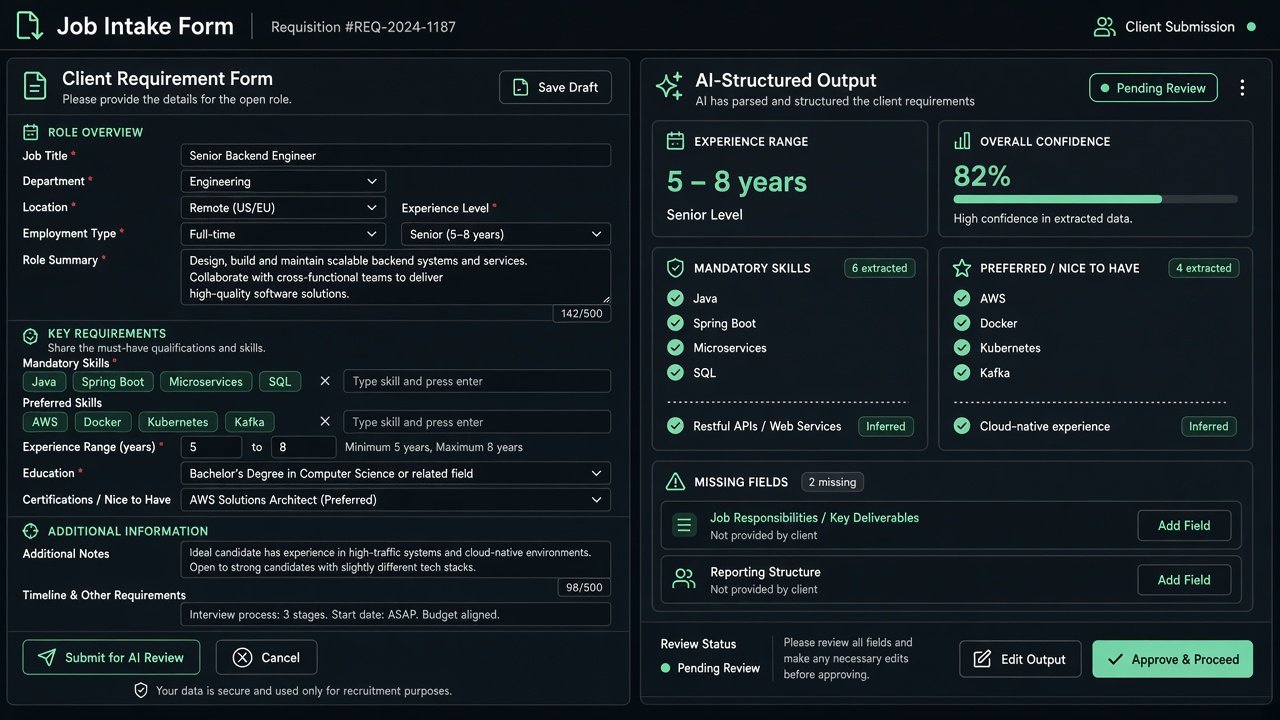
The first step of a larger recruitment automation system I'm designing for Skywalk Consultant. A client fills in a job requirement form. GPT turns the free text into clean, structured data: experience as a numeric range, mandatory and preferred skills as separate lists, and a list of anything the client left out. The record goes into a master Google Sheet with a job ID and a "pending review" status, and the recruiter gets an email to check it before any sourcing starts. The AI is told outright not to make hiring decisions or invent requirements.
In use
Usage figures are my own counts.
The actual n8n workflow

// Technical overview
The first stage of a recruitment pipeline for a consultancy. A web form captures a client's requirement, an LLM structures it, a sheet stores it, and a person approves before anything else happens.
// Trigger
An n8n Form Trigger. Required fields: client, contact person, contact email, job title, location, experience, mandatory skills, employment type (dropdown) and description. Optional: salary range, preferred skills, notice period.
// How it works, step by step
- 01
Normalise fields
A Set node renames form labels to snake_case keys.
- 02
Structure with an LLM
The OpenAI node receives a strict system prompt and the record as JSON. It returns job title, min and max experience as numbers, location, salary range, mandatory and preferred skills as arrays, notice period, employment type, a summary and a list of missing information.
- 03
Parse and merge
A Code node removes code fences, parses the JSON, merges it with the original form values, joins arrays into comma separated text and sets the status to Pending Review.
- 04
Record
An ID in the form SC-JOB-date-time is generated, and Google Sheets appendOrUpdate writes the row to the Jobs tab, matched on job ID so a re-run updates instead of duplicating.
- 05
Human review
Gmail sends the recruiter a summary with client, position, location, experience and status, asking for a review before sourcing begins.
// AI design
The assistant may only use supplied information, returns null for gaps, extracts numeric ranges and splits skills. It makes no hiring decisions and adds no requirements.
// What you can do with it
Clean job records
Messy client emails become one consistent schema.
Gap detection
The missing information list tells the recruiter exactly what to ask the client.
Next stages
The same record can later drive job post generation, candidate search and shortlist scoring.
// Guardrails
- Pending Review status makes a human the gate.
- Update-by-ID prevents duplicate rows.
- Strict no-invention prompt.
// Where it can go next
- Add retries and a JSON repair step before parsing.
- Save the summary and missing fields to the sheet.
- Add an approval link that moves the status to Approved.
Hiring a design leader for an AI product?
I'm open to design leadership roles. Send me a note and I'll reply within two working days.